Services & Pricing
Creating Reusable Service Packages
Build a catalog of standardized service offerings with preset pricing, descriptions, and deliverables to quote projects and draft invoices in seconds.
Re-typing the same scope of work, line item descriptions, and pricing every time you send an invoice wastes precious time. Flanceflow’s Service Catalog lets you define modular service packages once and insert them into estimates, contracts, and invoices with a single click.
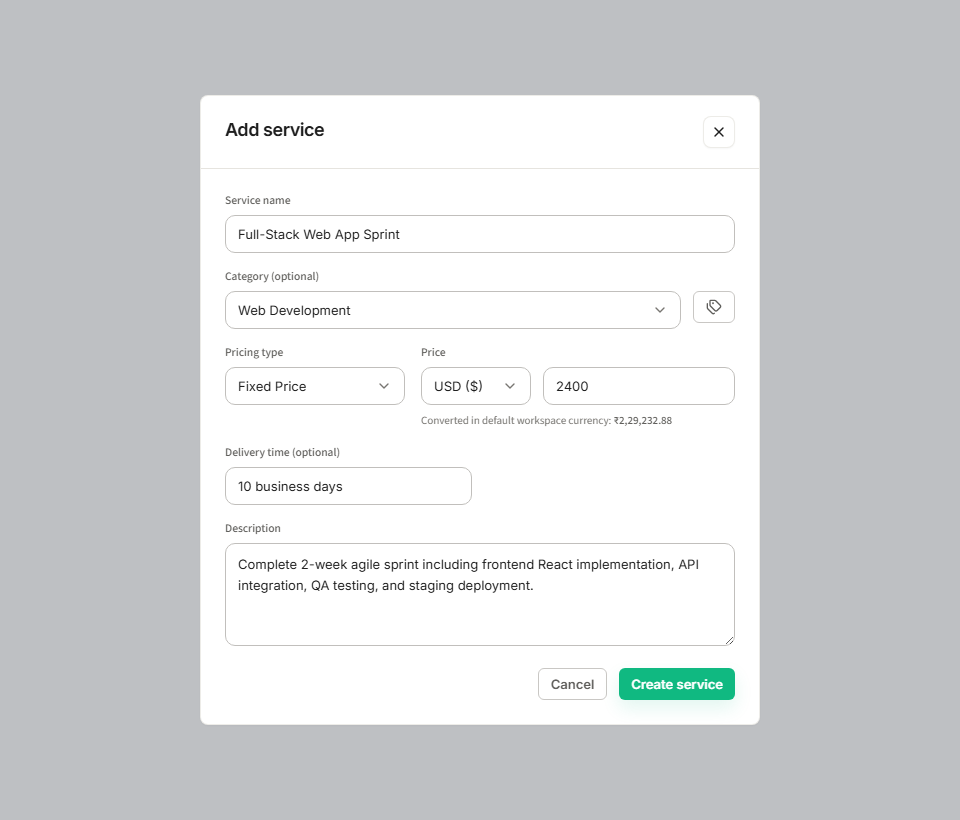
How to create a service package
- Click "Services" in the left workspace sidebar to open your Service Catalog.
- Click the "+ New Service" button in the upper right.
- Enter the Service Name (e.g., "Full-Stack Brand Identity System" or "Monthly SEO Maintenance").
- Select a Service Category from the dropdown (such as Design, Development, Strategy, or Writing).
- Choose the Billing Model: Fixed Project Fee, Hourly Rate, or Recurring Retainer.
- Set your standard pricing in your primary currency (and optionally add a dual-currency quote for USD or INR).
- Write a detailed default description listing key deliverables, inclusions, and revisions.
- Click "Save Service" to store it in your catalog.
Service package configuration fields
| Field | Example value | Why it matters | Invoice behavior |
|---|---|---|---|
| Service Name | Mobile App UI/UX Sprint | Recognizable client-facing deliverable title | Appears as the primary item title on invoice rows. |
| Category | Product Design | Organizes services by skill discipline | Used for reporting revenue by business line. |
| Pricing Model | Fixed Fee ($3,500) | Defines whether billing is per-unit, hourly, or flat | Calculates invoice line totals automatically. |
| Default Description | Includes 10 screens, interactive Figma prototype, 2 revisions | Prevents scope creep by clearly defining deliverables | Prefills the invoice line item description. |
| Tax Applicability | Standard Rate (18% / 0%) | Applies default tax rules for domestic vs export work | Pre-calculates tax line item amounts. |
Packaging tips for higher revenue
- Tiered packaging: Create "Starter", "Standard", and "Enterprise" variations of your primary service to provide clients with choice while steering them toward higher-margin tiers.
- Add-on services: Keep modular add-ons in your catalog (e.g. "Expedited 48-Hour Delivery" or "Additional Revision Round") to monetize scope changes effortlessly.
- Hourly vs fixed clarity: If offering hourly work, set a default estimate (e.g., 20 hours @ $85/hr) to give clients an upfront budget expectation.
Was this guide helpful?
👍 Yes
👎 No