Projects & Delivery
Managing Tasks & Task Lists
Create actionable tasks, assign sub-checklists, attach reference links, and delegate work to subcontractors with ease.
Behind every completed design or software build are dozens of granular tasks. Flanceflow combines lightweight task creation with checklist power so you can capture details without getting bogged down in complex enterprise project management software.
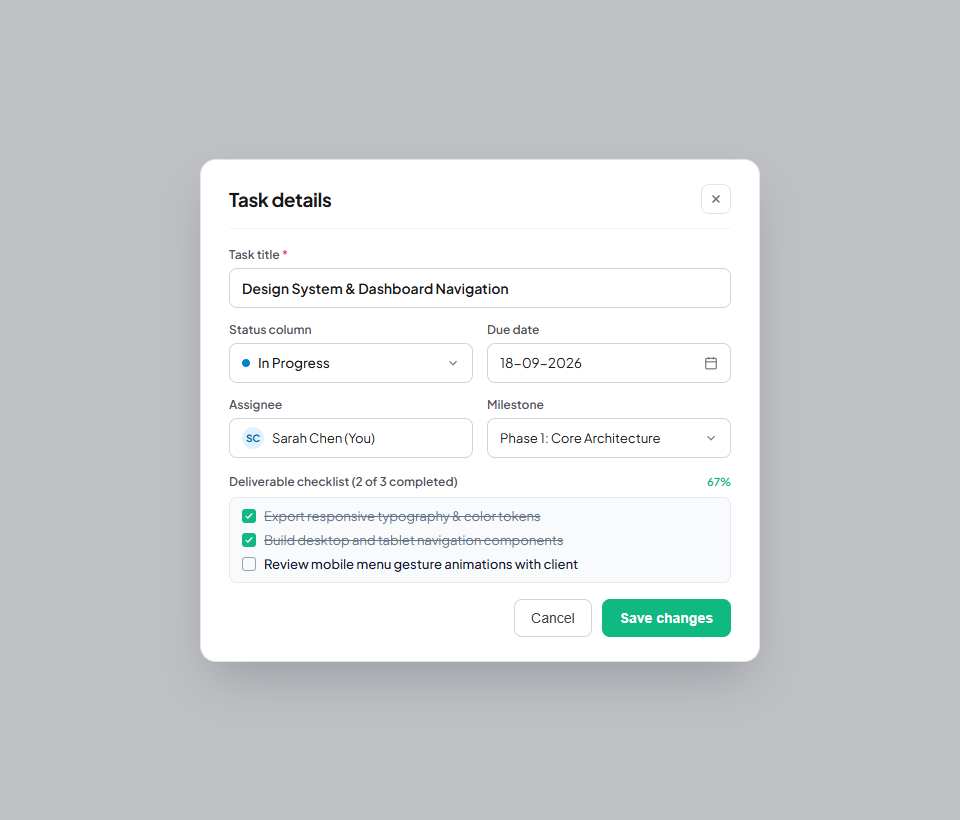
How to manage project tasks
- Open your project workspace and click the "+ Add Task" button in any column.
- Enter the Task Title (e.g., "Design Hero Section Illustrations").
- Click the task card to open the detail modal.
- Add a description, attach design links (Figma, Google Drive, Loom), and assign a collaborator.
- Add a Checklist: Break the task into sub-steps (e.g. "Draft concepts", "Select color palette", "Export SVG vectors").
- Set an individual task due date if it needs to precede the main milestone deadline.
- Drag the task card across columns as you complete each stage of work.
Task modal capabilities
| Task feature | Where found | Functionality | Team collaboration |
|---|---|---|---|
| Sub-checklists | Task Modal > Add Checklist | Interactive checkboxes for granular steps | Shows progress indicator on card face. |
| Assignee | Task Modal > Collaborators | Assigns card to specific team member | Filters tasks on member’s personal dashboard. |
| Attachments & Links | Task Modal > Assets | Link external Figma, GitHub, or Drive URLs | Ensures contractors have immediate access to specs. |
| Due Date | Task Modal > Calendar | Individual task deadline | Pushes calendar reminder alerts. |
Task management tips
- Batch creation: Press `Shift + Enter` in the task creation input to quickly add 5 tasks in a row without clicking.
- Personal task view: Click "Tasks" in the main left sidebar to see all tasks assigned to you across ALL projects in one centralized view.
- Subcontractor permissions: Team members with the "Member" role only see tasks within projects they have been added to.
Was this guide helpful?
👍 Yes
👎 No