Projects & Delivery
Creating a Project Workspace
Set up organized client projects with deliverable scopes, budgets, deadlines, and milestone trackers in under two minutes.
Projects in Flanceflow bridge the gap between financial billing and day-to-day creative execution. Each project brings together your client contact, project budget, deliverable milestones, task board, and shared client portal into one clean workspace.
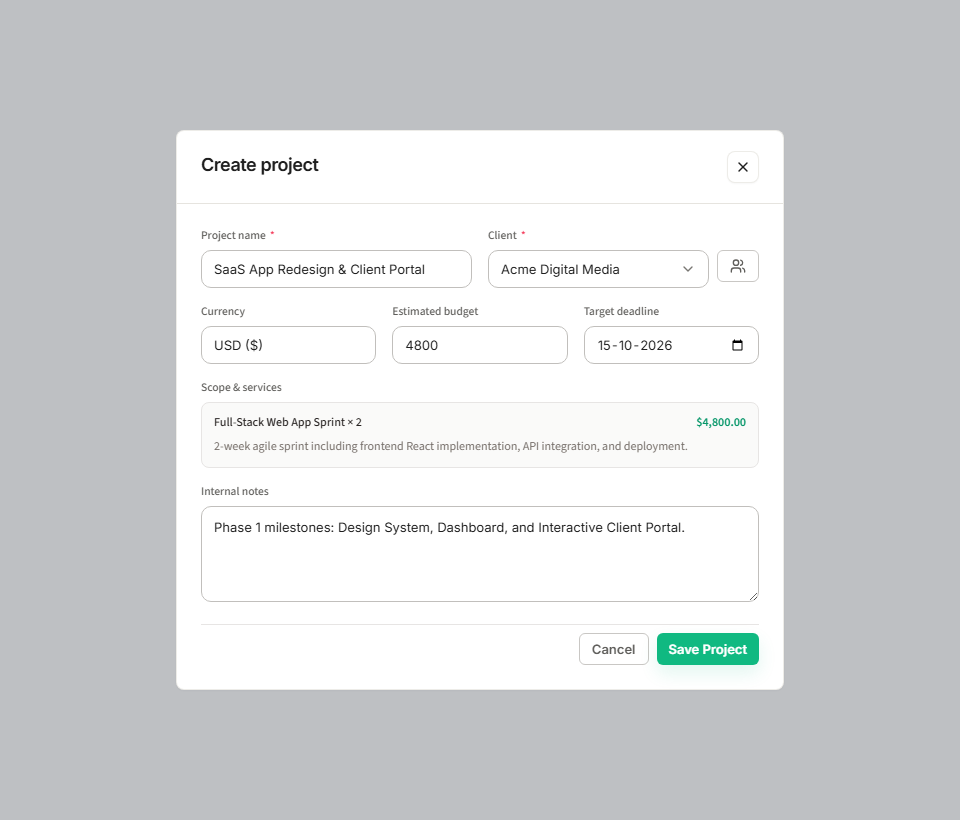
How to create a new project
- Click "Projects" in the left sidebar navigation, or use the topbar quick-create "+ New" button.
- Click "+ New Project" in the top-right corner to open the creation modal.
- Enter the Project Title (for example, "FinTech Mobile App Redesign").
- Select the linked Client from your roster (or click "+ Add Client" to create one immediately).
- Choose the Billing Structure: Fixed Project Fee, Hourly Rate, or Retainer.
- Set the total project budget and choose your billing currency (USD or INR).
- Specify the project start date and final target deadline.
- Optionally assign team collaborators if working with subcontractors.
- Click "Create Project" to launch your project workspace.
Project configuration fields
| Project parameter | Example | Function in Flanceflow | Client portal visibility |
|---|---|---|---|
| Project Name | SaaS Onboarding UX Revamp | Identifies project across all boards and invoices | Visible as the primary title in the client portal. |
| Linked Client | Acme Corp | Connects client contact info and billing address | Client sees their own studio branding and greeting. |
| Total Price / Budget | $4,800.00 | Calculates billing progress against invoices | Visible in portal if budget transparency is toggled on. |
| Deadline | Oct 31, 2026 | Drives countdown timers and overdue warning alerts | Displayed prominently on client deliverable milestones. |
| Status | In Progress | Positions project on the master Kanban board | Reflected on the client portal status pill. |
Project management tips
- Break large projects into phases: For multi-month contracts, create Phase 1, Phase 2, and Phase 3 deliverables with individual milestones to keep momentum high.
- Color tags: Assign color tags to distinguish between client project types (e.g. blue for design, green for development).
- Pinning priority projects: Hover over any critical project and click the star icon to pin it to your dashboard top bar for instant 1-click access.
Was this guide helpful?
👍 Yes
👎 No