Payments & Cash Flow
Recording a Payment Manually
Record bank wires, UPI transfers, cash deposits, and stripe transactions to balance invoices, issue receipts, and update cash flow metrics.
When clients pay you via direct bank wire, NEFT, IMPS, UPI, or PayPal outside of an automated checkout flow, you need an easy way to mark invoices as paid. Flanceflow lets you log full or partial payments in seconds, automatically reconciling balances and issuing branded payment receipts.
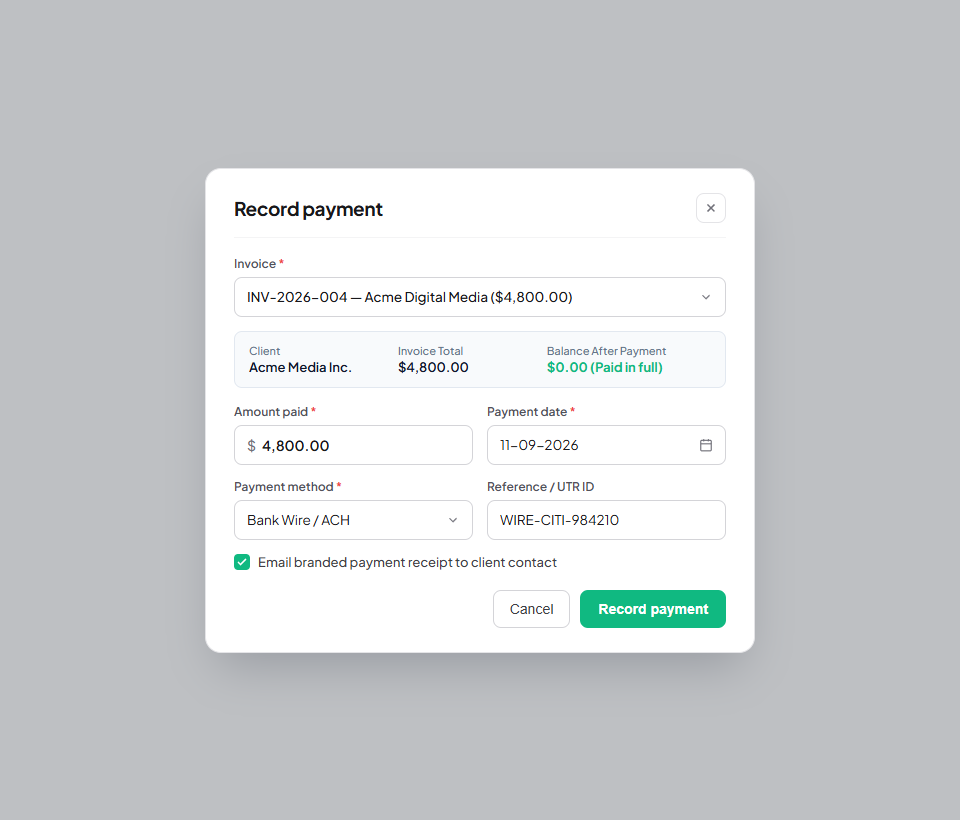
How to record a manual payment
- Navigate to "Invoices" or "Payments" in the left workspace sidebar.
- Locate the outstanding invoice you wish to reconcile.
- Click the "+ Record Payment" button on the invoice row (or inside the invoice detail modal).
- Enter the Amount Paid (it defaults to the remaining balance due, but you can enter partial amounts).
- Select the Payment Date when funds arrived in your bank account.
- Choose the Payment Method: Bank Wire / ACH, UPI, Credit Card, PayPal, Check, or Cash.
- Add an optional Reference / Transaction ID (e.g. wire reference number or UPI UTR code) for bookkeeping reconciliation.
- Check the "Email Payment Receipt to Client" box to send a branded confirmation automatically.
- Click "Record Payment". The invoice status updates to "Paid" (or "Partially Paid"), and your cash flow dashboard increments immediately.
Payment recording parameters
| Field | Default value | Purpose | Impact on dashboard |
|---|---|---|---|
| Amount Paid | Full remaining balance | Exact amount received in your account | Adds directly to "Collected Revenue". |
| Payment Date | Today’s date | Calendar day money was received | Positions payment in monthly revenue charts. |
| Payment Method | Bank Transfer | Categorizes payout channel for auditing | Classifies revenue source in analytics. |
| Transaction Reference | Optional note | Wire reference or UTR transaction hash | Crucial for tax audits and bank reconciliations. |
Cash flow reconciliation tips
- Automated receipt dispatch: Enabling "Email Payment Receipt" reassures clients that their payment was received and accepted without requiring manual email follow-up.
- Bank fee adjustments: If your bank deducted an international wire fee (e.g. $15 intermediary fee), you can record the net amount received and log the bank fee deduction as an expense note.
- Reversing accidental payments: If you recorded a payment on the wrong invoice by mistake, click "Payments", locate the entry, and click "Delete Payment" to immediately restore the unpaid invoice balance.
Was this guide helpful?
👍 Yes
👎 No