Projects & Delivery
Kanban Board & the Six Status Columns
Master Flanceflow’s visual delivery pipeline using the six standardized project columns from Backlog to Completed and Cancelled.
Keeping projects on track requires clear visual momentum. Flanceflow organizes your work across six standardized status columns designed specifically for freelance service delivery workflows.
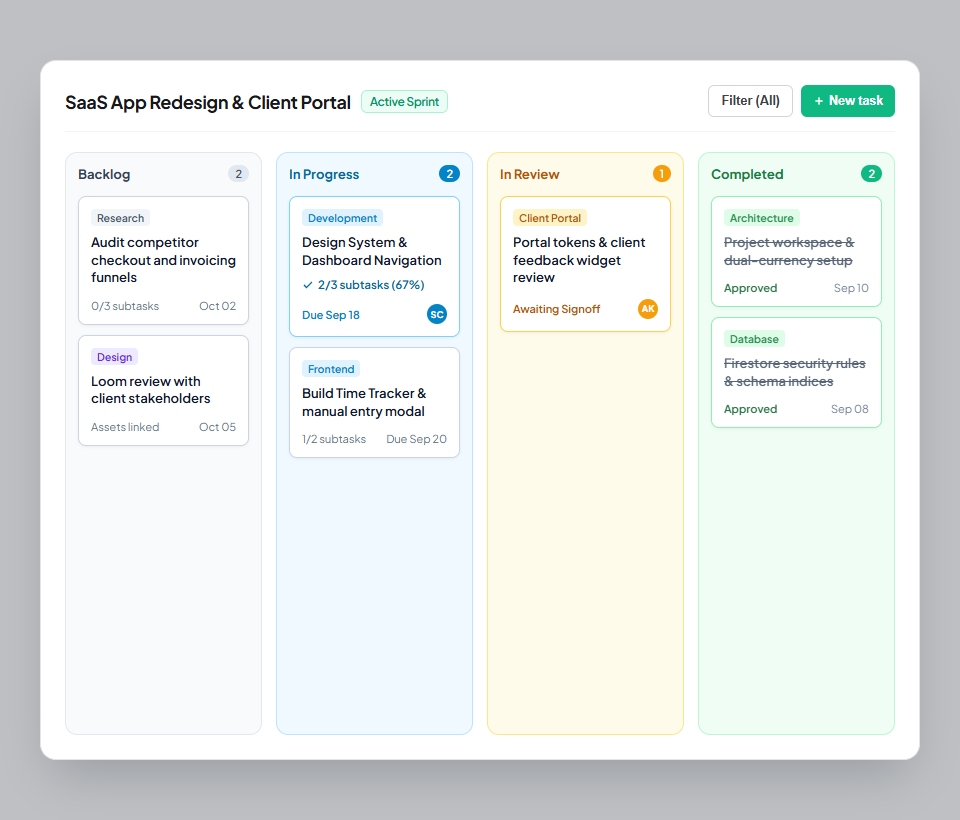
Using the six Kanban columns
- Open any project from your Projects board to view its Kanban board.
- Backlog: Drop incoming client requests, initial ideas, and raw assets here before work begins.
- In Progress: Move cards here when actively designing, coding, or drafting deliverables.
- In Review: Drag cards here when deliverables have been shared with the client or team lead for feedback.
- Completed: Move cards here once the client has approved the deliverable and it is locked in.
- On Hold: Park tasks here if you are waiting on client assets, copy, or budget approvals before proceeding.
- Cancelled: Store scoped tasks that were formally removed from the project agreement without deleting their history.
The six project columns breakdown
| Column name | Default state | When tasks belong here | Impact on progress % |
|---|---|---|---|
| Backlog | 0% Progress | Unstarted tasks, raw ideas, unapproved scope additions | Counted as remaining work; 0% credit. |
| In Progress | Active Work | Currently open deliverables actively being produced | Counted as in-flight work. |
| In Review | Awaiting Client | Submitted deliverables awaiting client sign-off | Counted towards milestone completion review. |
| Completed | 100% Done | Approved deliverables signed off by client | Contributes full weight towards 100% progress. |
| On Hold | Frozen | Tasks blocked by external dependencies or unpaid invoices | Freezes countdown timer without penalizing progress. |
| Cancelled | Voided | Scope items mutually removed from contract | Excluded from progress calculation entirely. |
Kanban workflow best practices
- Limit Work in Progress (WIP): Avoid keeping more than 3 cards in "In Progress" at a time to minimize multitasking friction and deliver work faster.
- Client review column: Always move items to "In Review" before messaging the client with links so your board reflects true pending approvals.
- Task checklist progress: Tasks with sub-item checklists show completion badges (e.g., "3/5 items") right on the face of the Kanban card.
Was this guide helpful?
👍 Yes
👎 No